Pearson Edexcel · GCSE · Computer Science
Topic 4: Networks
Master the fundamentals of computer networks, from the internet's structure to security protocols. This topic is essential for understanding how our connected world operates and is a guaranteed high-mark area in your exam.
- 6 min read
- 3 worked examples
- 5 practice questions
- 6 key terms
Study Notes
Overview
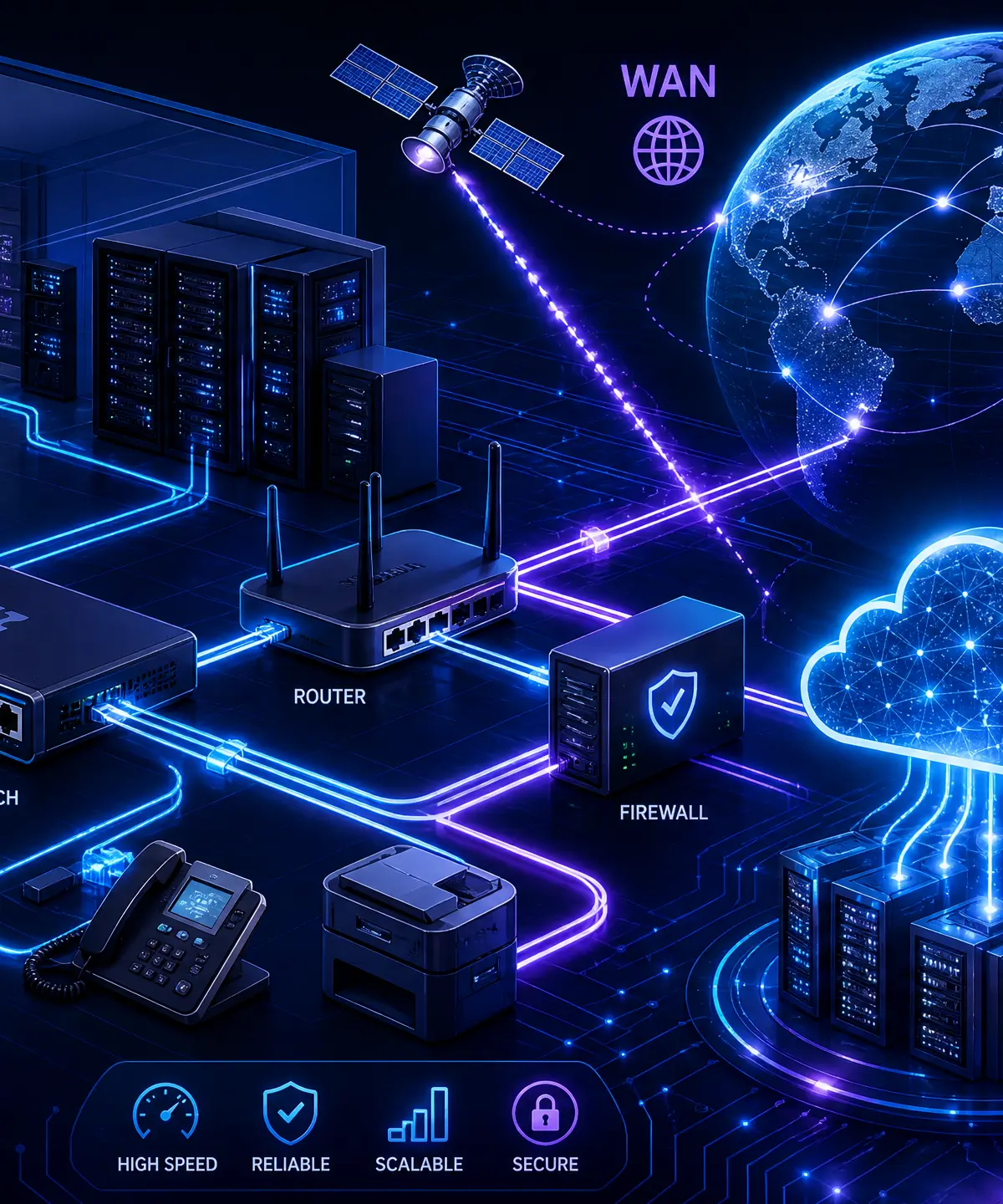
Networks form the invisible backbone of modern society. Whether you are streaming a video, sending a message, or playing an online game, you are relying on the principles of computer networking. This topic covers everything from the basic definitions of LANs and WANs to the complex layers of the TCP/IP model and the critical security measures that protect our data.
Understanding networks is crucial for your GCSE Computer Science exam because examiners consistently test this area in detail. You will be expected to not only recall definitions but also apply your knowledge to real-world scenarios, calculate transmission times, and compare different network topologies. This topic links closely with cybersecurity and the ethical impacts of technology.
Key Concepts
Concept 1: Types of Networks (LAN vs WAN)
A network is simply two or more computers connected together to share resources (like printers or internet connections) and communicate. The exam focuses heavily on the distinction between a Local Area Network (LAN) and a Wide Area Network (WAN).
A LAN covers a small geographical area, such as a single building or a school campus. Crucially, the organisation that uses the LAN typically owns all the hardware and infrastructure. A WAN covers a large geographical area, connecting multiple LANs together. The infrastructure for a WAN is usually leased from telecommunications companies. The internet is the ultimate example of a WAN.
Example: A school's internal network where students log in to access shared drives is a LAN. When that school connects to another school across the country to share data, they form a WAN.
Concept 2: Network Topologies
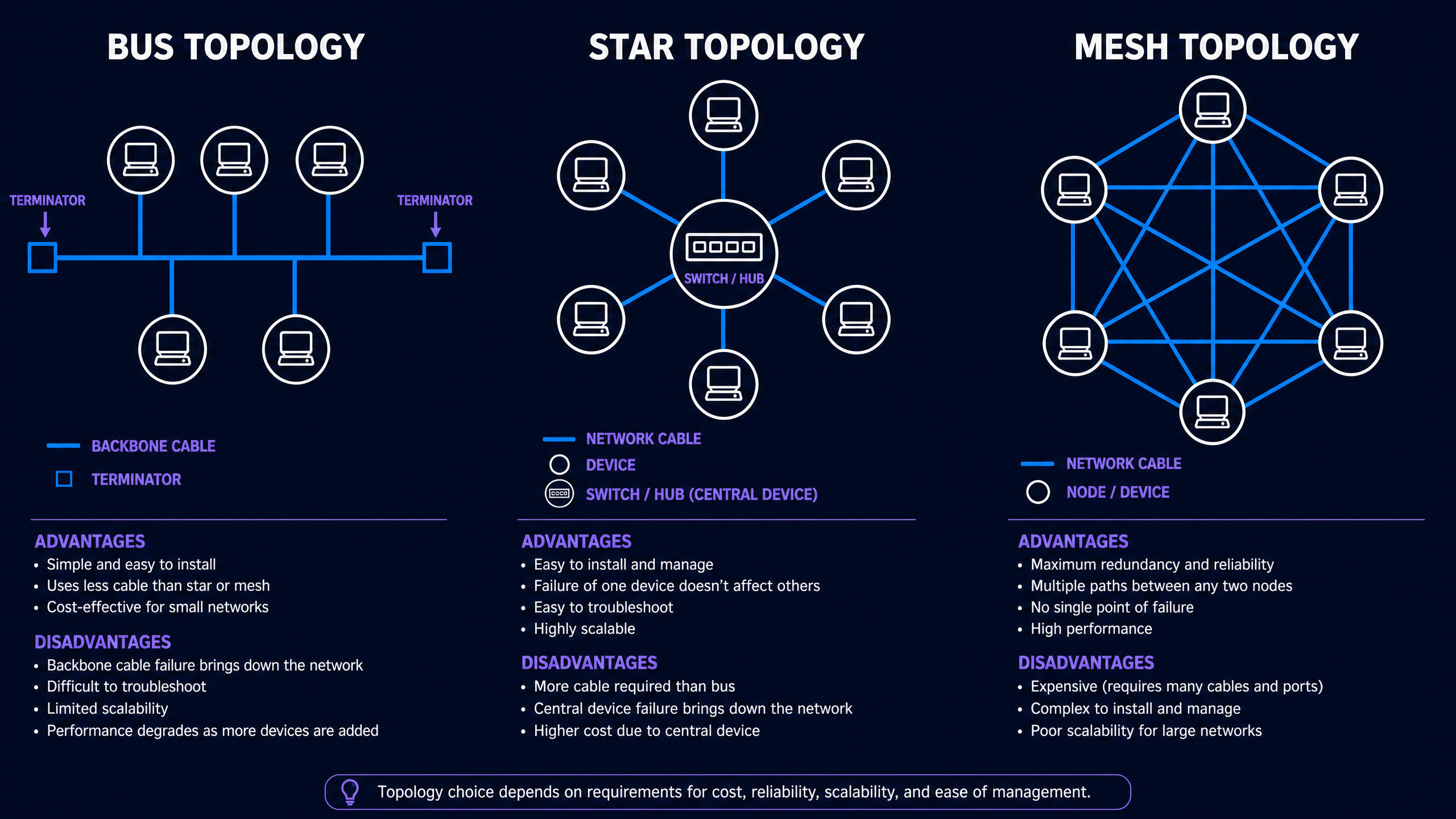
Topology refers to the physical or logical arrangement of devices on a network. You must understand the characteristics, advantages, and disadvantages of three main types: Bus, Star, and Mesh.
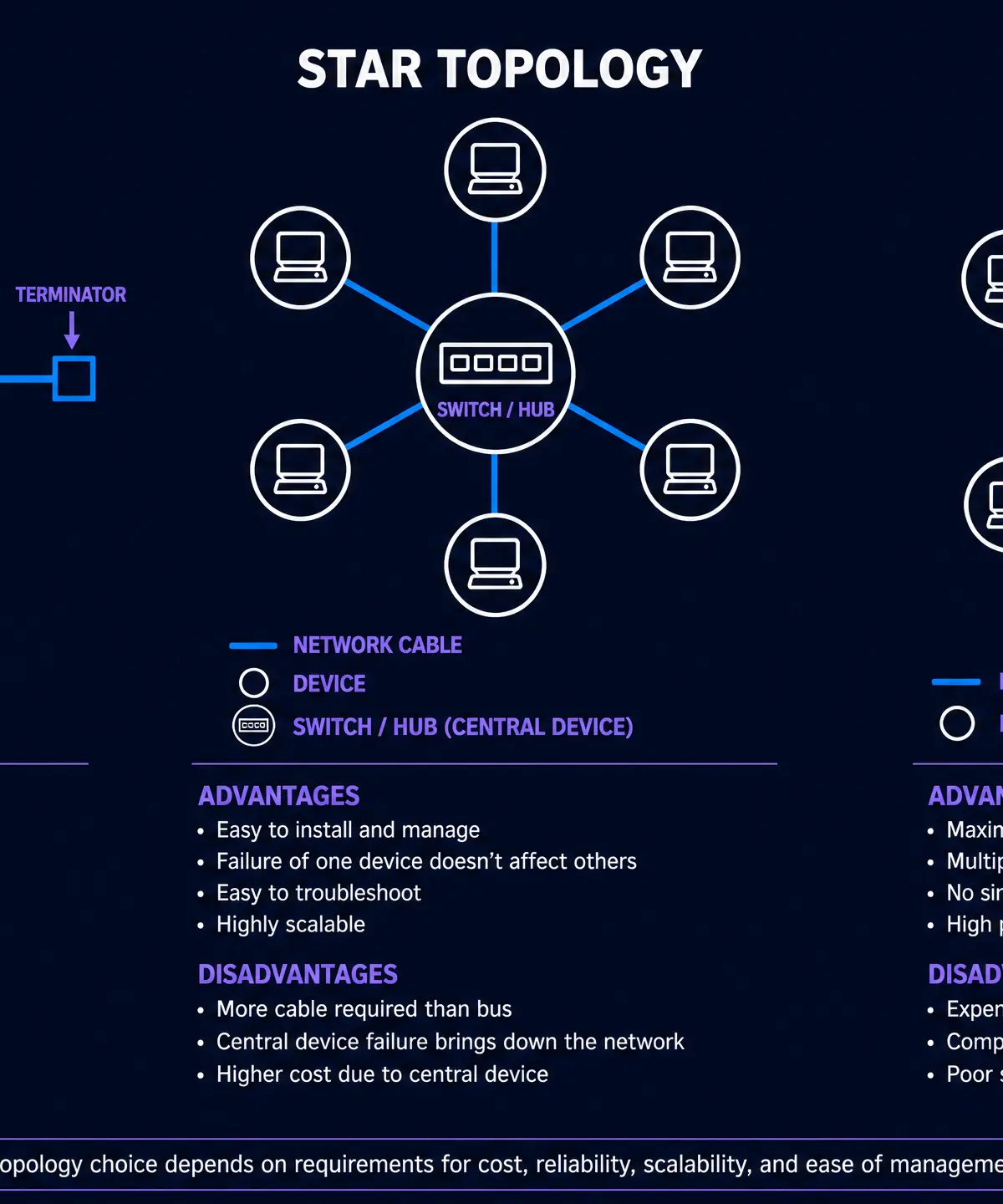
- Bus Topology: All devices connect to a single backbone cable. It is cheap and easy to install, but if the backbone fails, the entire network goes down. Performance degrades significantly as more devices are added.
- Star Topology: All devices connect to a central switch or hub. This is highly reliable because if one cable fails, only that specific device is affected. However, if the central switch fails, the whole network fails.
- Mesh Topology: Every device connects to every other device. This provides maximum redundancy and reliability, as data can take multiple paths. The main drawback is the high cost and complexity of cabling.
Concept 3: The TCP/IP 4-Layer Model
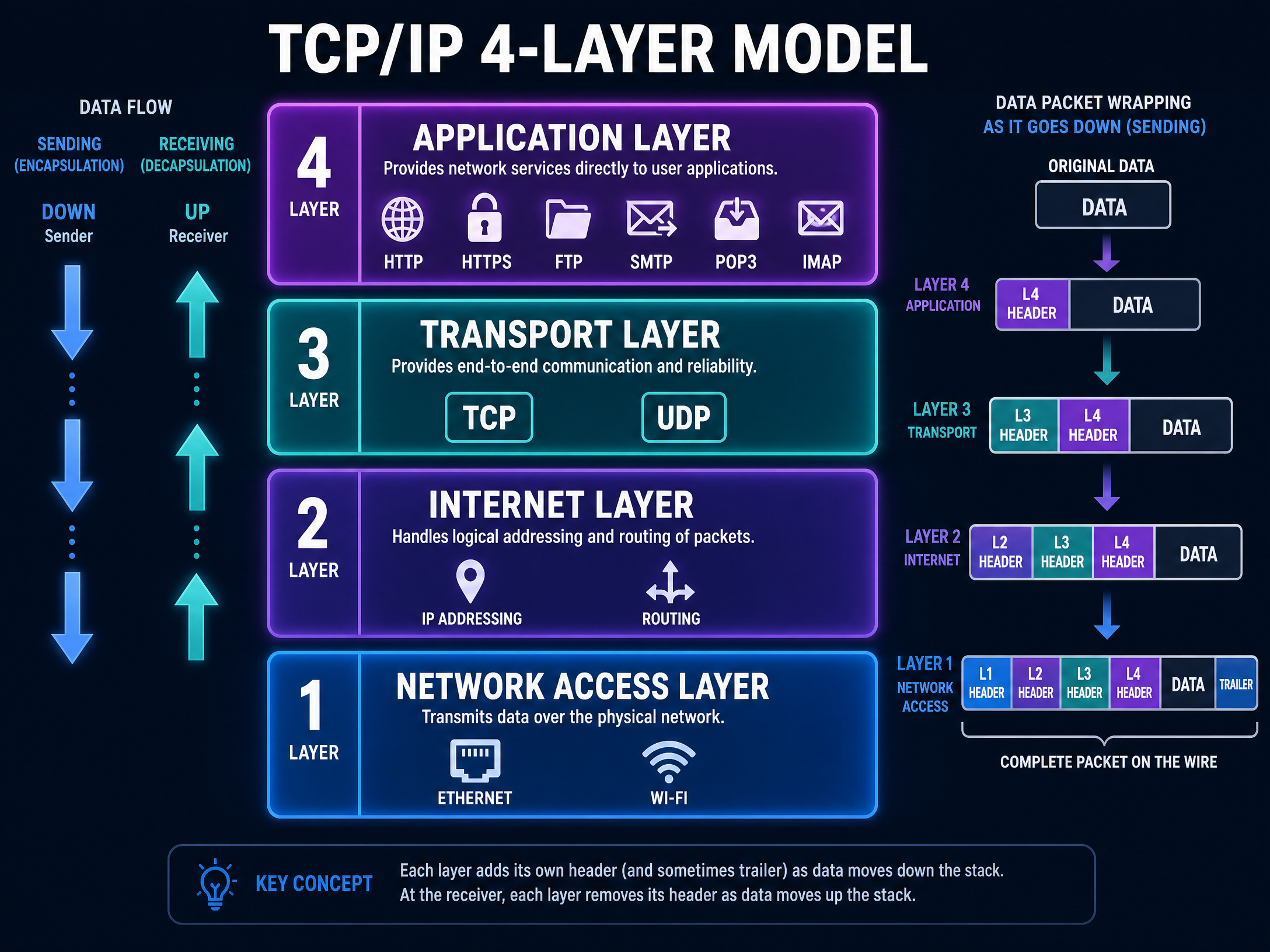
Data isn't just sent as one big chunk; it is broken down and processed through layers. The TCP/IP model is a conceptual framework that describes this process using four layers.
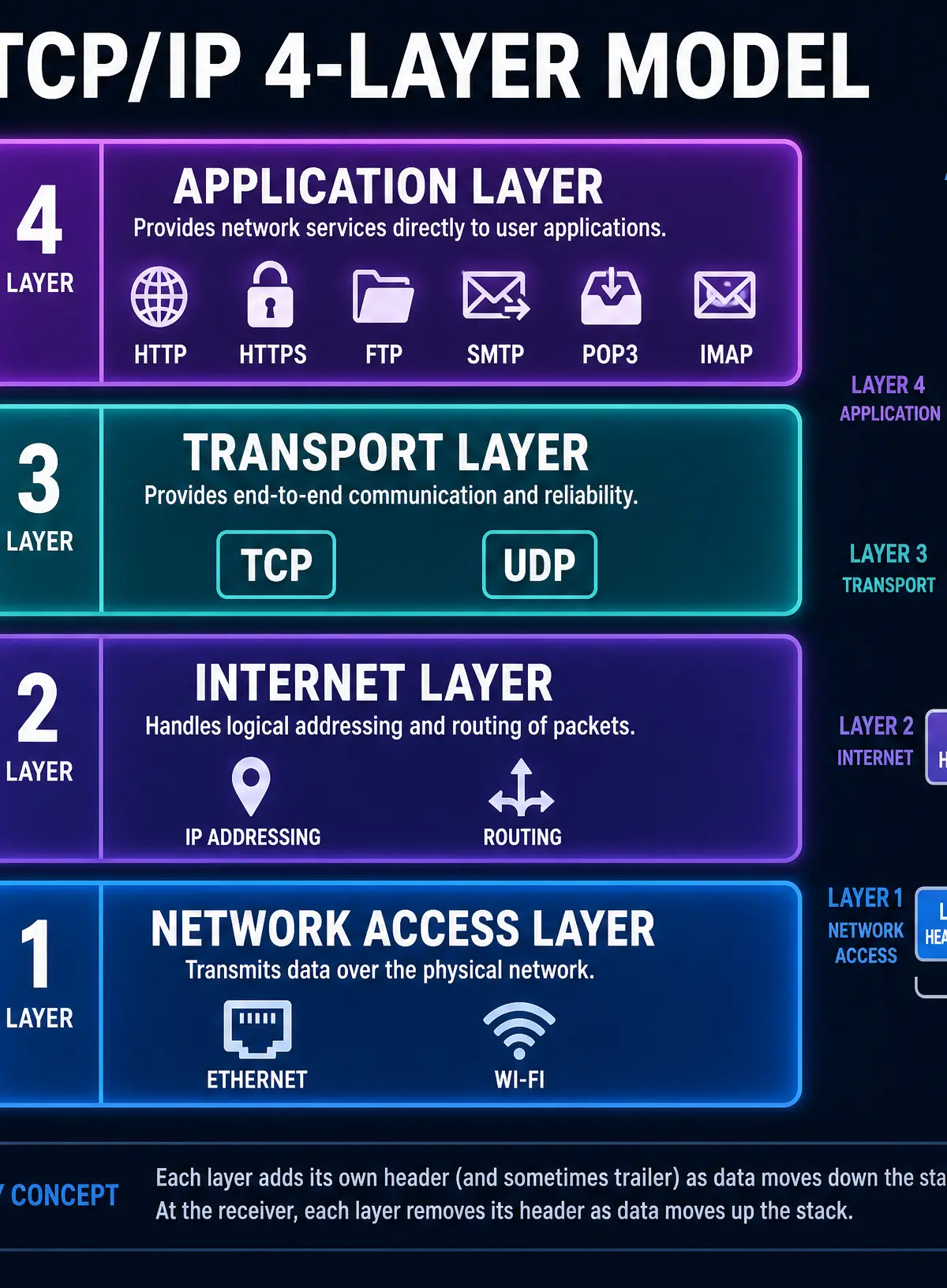
- Application Layer: Where network applications operate (e.g., web browsers, email clients). Protocols: HTTP, HTTPS, FTP, SMTP, POP3, IMAP.
- Transport Layer: Sets up the communication between two hosts and agrees on settings like language and packet size. Protocols: TCP, UDP.
- Internet Layer: Addresses and packages data for transmission. Routes the packets across the network. Protocol: IP.
- Network Access Layer: The physical hardware and cables that connect the network. Protocols: Ethernet, Wi-Fi.
Concept 4: Network Security
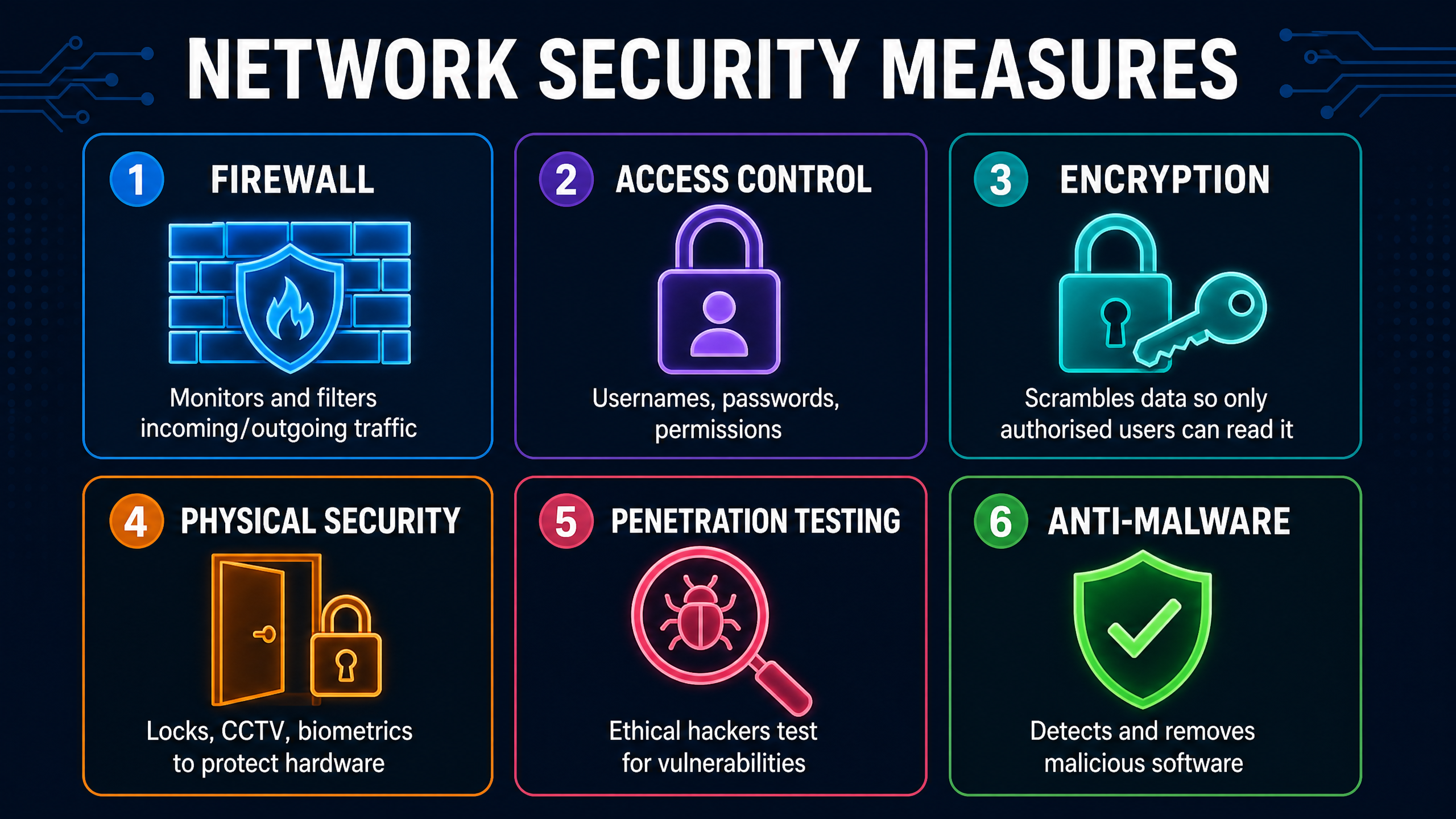
Securing a network is paramount to protect against data theft, malware, and unauthorised access. You must be able to describe various security measures.
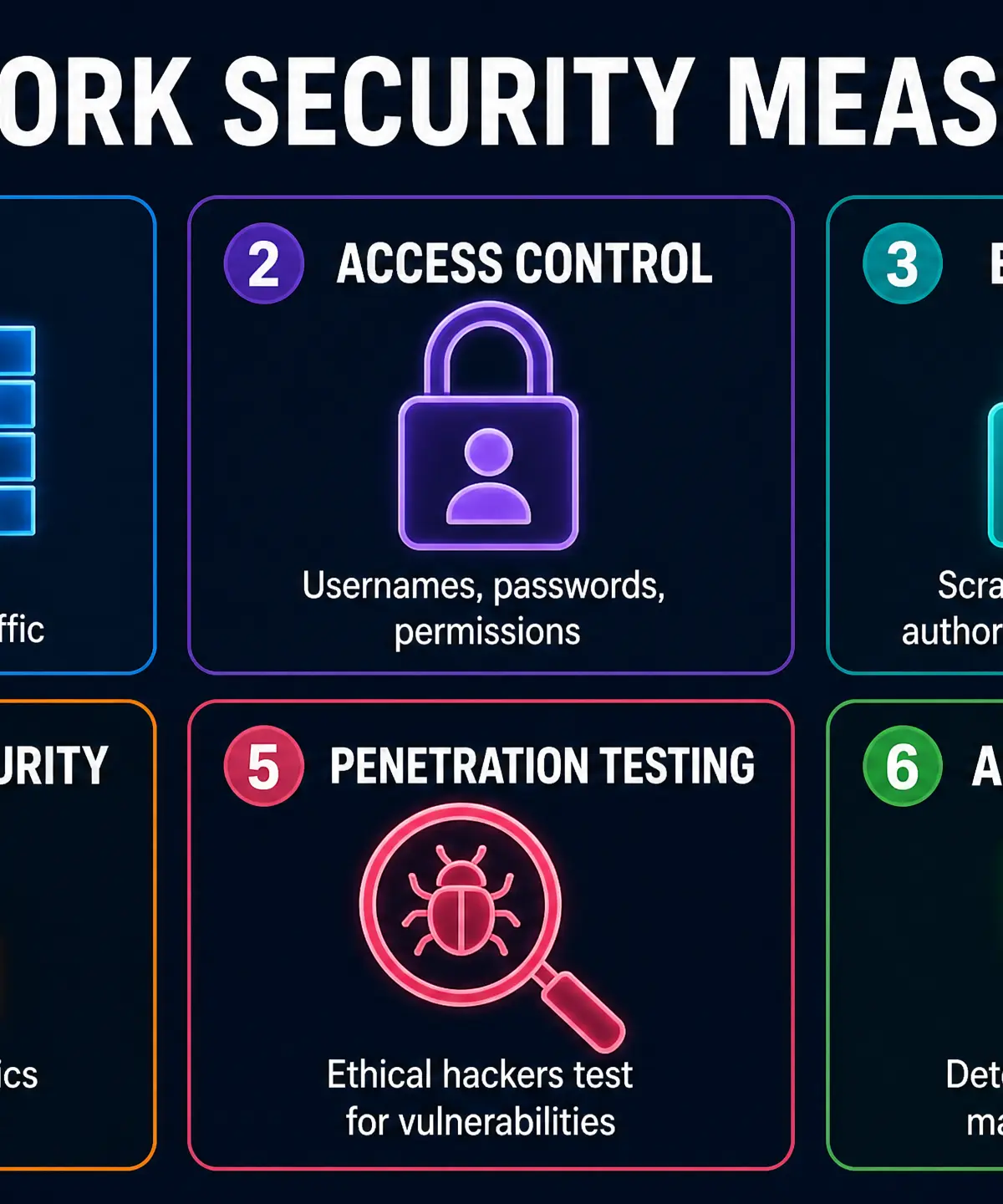
- Firewalls: Monitor and filter incoming and outgoing network traffic based on predetermined security rules.
- Encryption: Scrambles data into an unreadable format using a key, ensuring that intercepted data cannot be understood.
- Access Control: Restricts user access through usernames, strong passwords, and varying permission levels.
- Penetration Testing: Authorised, simulated cyberattacks to evaluate the security of the system and identify vulnerabilities before malicious hackers do.
Podcast Episode: Mastering Networks
Listen to this 10-minute audio guide for a complete walkthrough of the topic, including exam tips and a quick-fire quiz!

Mathematical/Scientific Relationships
To calculate how long it takes to transmit a file across a network, you must use the following formula:
Transmission Time = File Size / Transfer Rate
Crucial Rule: You MUST ensure the units match before calculating. File sizes are often given in Bytes (B) or Megabytes (MB), while transfer rates are given in bits per second (bps) or Megabits per second (Mbps).
- 1 Byte = 8 bits
- To convert Megabytes to Megabits, multiply by 8.
Example: Calculate the time to transmit a 5 MB file over a network with a transfer rate of 10 Mbps.
- Convert File Size to bits: 5 MB * 8 = 40 Megabits (Mb)
- Apply formula: Time = 40 Mb / 10 Mbps
- Result: 4 seconds.
Practical Applications
Understanding protocols is essential for everyday tasks. When you see the padlock icon in your browser, you know HTTPS is encrypting your data, keeping your passwords safe from packet sniffers on public Wi-Fi. When setting up a home network, choosing between the reliability of wired Ethernet and the convenience of wireless Wi-Fi requires understanding the trade-offs in bandwidth and latency.
Visual Resources
3 diagrams and illustrations
Interactive Diagrams
2 interactive diagrams to visualise key concepts
Conceptual Flow Outline
The process of data encapsulation as it moves down the TCP/IP model.
Conceptual Flow Outline
Decision flowchart for web browsing protocols.
Worked Examples
3 worked examples — open one to explore the question and available guidance.
Practice Questions
Test your understanding — click to reveal model answers
State the purpose of a router in a network. (1 mark)
Hint: Think about how data gets from your home network to a server on the internet.
Describe two differences between a LAN and a WAN. (4 marks)
Hint: Think about the geographical area covered and who owns the cables/infrastructure.
Explain how encryption helps to keep data secure on a network. (2 marks)
Hint: What happens to the data before it is sent, and what happens if a hacker intercepts it?
A user is downloading a 1.5 Gigabyte (GB) video file. Their internet connection has a bandwidth of 60 Megabits per second (Mbps). Calculate the time it will take to download the file in seconds. (3 marks)
Hint: You need to convert Gigabytes to Megabytes, then Megabytes to Megabits before dividing.
Explain the role of the Transport Layer and the Internet Layer in the TCP/IP model. (4 marks)
Hint: Which layer breaks data into packets? Which layer adds IP addresses?